Academic project / 08
Data Warehouse for a Beauty & Cosmetics Business
Building a data warehouse on a Constellation Schema with the Microsoft BI Stack
At a glance
Project overview
Case study content
The problem: when business data is scattered across multiple systems
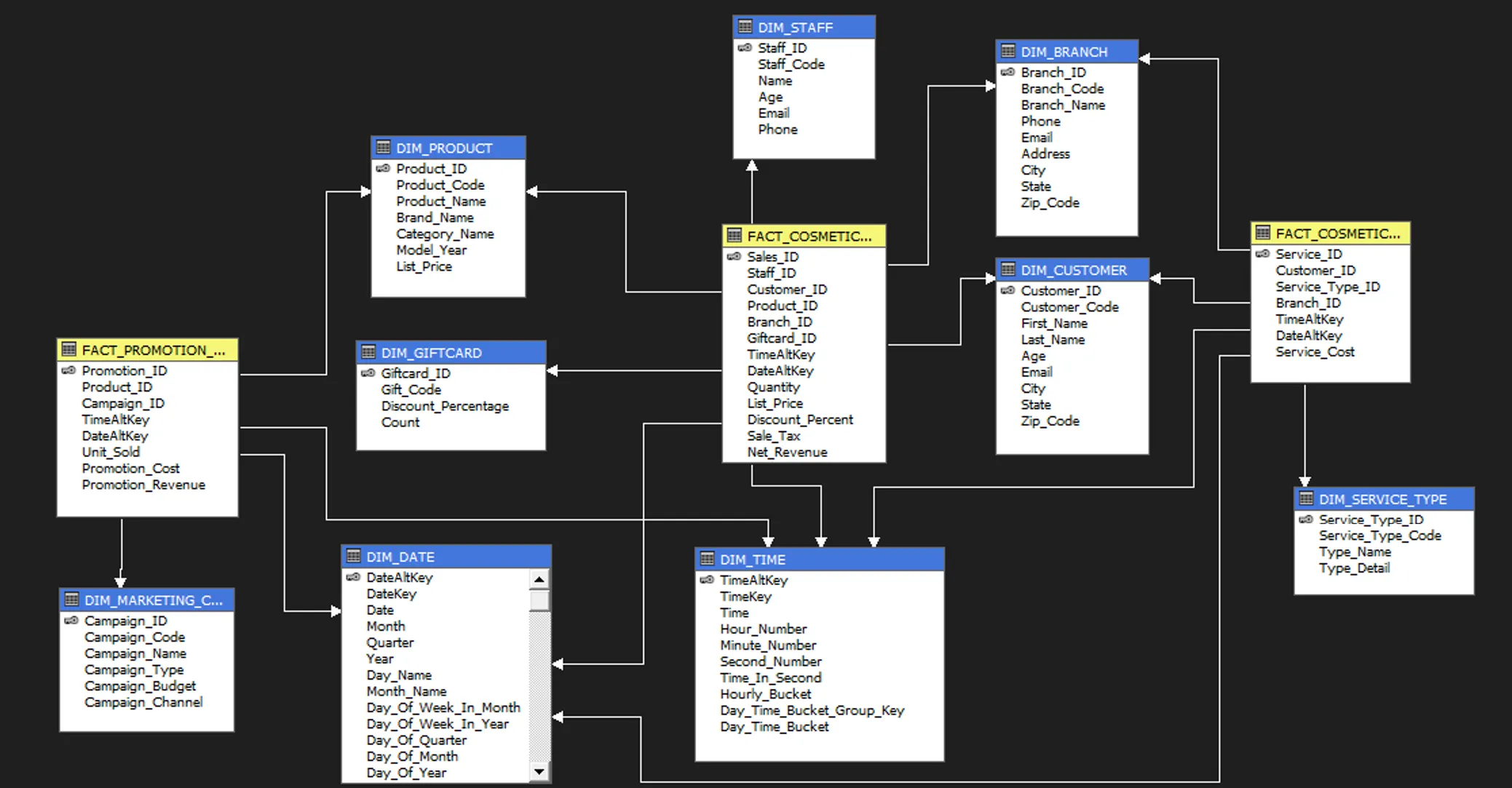
The team built a Data Warehouse for a hypothetical cosmetics and beauty services business in the US. The business concept was self-built, with data generated by AI and then edited to fit realistic analytical scenarios. The problem: the business managed sales, services, customer, and marketing data across multiple disconnected systems, making it hard to consolidate and analyze across dimensions — leadership had no unified view to support decision-making.
The goal was to build a unified data warehouse supporting revenue analysis, marketing campaign effectiveness, branch performance, and customer behavior across multiple dimensions — following the standard Microsoft BI Stack: SSIS for ETL, SSAS for OLAP cubes, MDX for querying, and Power BI for visualization.
Role: researching the architecture and supporting the team’s implementation
Given the heavy workload across courses that semester, the team divided focus areas among members. On this project, the role centered mainly on:
- Researching Data Warehouse architecture and the Constellation Schema model
- Tracking the team’s implementation progress and helping finalize the project
- Learning the Microsoft BI Stack workflow (SSIS, SSAS, MDX, Power BI)
While not directly responsible for building the core pipeline, this was the first time going through a complete Data Warehouse process — from data model design, ETL, OLAP, through to final visualization.
The process: understanding the difference between a transactional database and an analytical warehouse
The team’s workflow followed these steps:
- Define the business scenario and identify the analytical needs
- Design the Data Warehouse following a Constellation Schema, with Facts and Dimensions supporting sales, service, and marketing analysis
- Prepare and organize the source data
- Run the ETL process using SQL Server Integration Services (SSIS)
- Build the OLAP cube using SQL Server Analysis Services (SSAS)
- Set up hierarchies for the dimensions
- Write MDX queries to support multi-dimensional analysis
- Build the dashboard in Power BI Desktop
- Finalize the report and presentation
Results
- Completed the Data Warehouse system following a Constellation Schema
- Built three sets of MDX queries to support different analytical needs
- Deployed a visual dashboard in Power BI
- Gained an understanding of how to build a complete Business Intelligence system following the Microsoft BI Stack standard
The biggest takeaway
The project clarified how organizing data in a Data Warehouse differs from a transactional database (OLTP) — a warehouse is optimized for reading and multi-dimensional analysis, while a transactional database is optimized for writing and handling day-to-day business operations. The ETL process and SSIS’s role in extracting, transforming, and loading data became much clearer, along with the concept of Cubes and OLAP for multi-dimensional analysis, and the role of MDX in querying across those dimensions.
Limitations
The level of hands-on implementation in this project was limited since the team split the workload across multiple courses running concurrently. There wasn’t an opportunity to directly build the full ETL pipeline or develop the cube from scratch, and it wasn’t deployed on a Cloud environment or more modern data platforms.
If I did it again
- Directly build the entire Data Warehouse instead of just contributing research
- Design the ETL process with more automation
- Apply Slowly Changing Dimensions (SCD) appropriately for dimensions that change over time
- Add Incremental Load instead of reloading the full dataset on every ETL run
- Experiment with deploying on Microsoft Fabric or Azure Data Factory
- Build a dashboard with KPIs more directly tied to real decision-making needs
MDX Analysis Queries
These MDX queries were used to analyze branch revenue, service performance and marketing campaign effectiveness from the OLAP cube.
Query 1 — Branch Revenue & Product Contribution
WITH
    MEMBER [Measures].[Total Branch Revenue] AS
            ([Measures].[Net Revenue],
         [DIM BRANCH].[Branch Name].CurrentMember,
         [DIM TIME].[Day Time Bucket].DefaultMember,
         [DIM PRODUCT].[Product Name].DefaultMember),
        FORMAT_STRING = "Currency"
    MEMBER [Measures].[Product Contribution to Branch] AS
        IIF(
            [Measures].[Total Branch Revenue] = 0,
            NULL,
            [Measures].[Net Revenue] / [Measures].[Total Branch Revenue]
        ),
        FORMAT_STRING = "Percent"
    MEMBER [Measures].[Total Quantity] AS
        SUM(
            [DIM TIME].[Day Time Bucket].[Day Time Bucket].Members,
            [Measures].[Quantity]
        ),
        FORMAT_STRING = "#,##0"
    MEMBER [Measures].[Discount Impact on Quantity] AS
        IIF(
            [Measures].[Discount Percent] = 0,
            NULL,
            [Measures].[Total Quantity] / [Measures].[Discount Percent]
        ),
        FORMAT_STRING = "#,##0.00"
SELECT
    NON EMPTY {
        [Measures].[Net Revenue],
        [Measures].[Total Quantity],
        [Measures].[Discount Percent],
        [Measures].[Total Branch Revenue],
        [Measures].[Product Contribution to Branch],
        [Measures].[Discount Impact on Quantity]
    } ON COLUMNS,
    NON EMPTY (
        NONEMPTY(
            GENERATE(
                NONEMPTY(
                    TOPCOUNT(
                        [DIM BRANCH].[Branch Name].[Branch Name].Members,
                        10,
                        [Measures].[Net Revenue]
                    ),
                    [Measures].[Net Revenue]
                ),
                CROSSJOIN(
                    [DIM BRANCH].[Branch Name].CurrentMember,
                    CROSSJOIN(
                        NONEMPTY(
                            TOPCOUNT(
                                [DIM PRODUCT].[Product Name].[Product Name].Members,
                                1,
                                [Measures].[Net Revenue]
                            ),
                            [Measures].[Net Revenue]
                        ),
                        CROSSJOIN(
                            NONEMPTY(
                                TOPCOUNT(
                                    [DIM TIME].[Day Time Bucket].[Day Time Bucket].Members,
                                    1,
                                        ([Measures].[Net Revenue],
                     [DIM BRANCH].[Branch Name].CurrentMember,
                    [DIM PRODUCT].[Product Name].CurrentMember)
                                ),
                                [Measures].[Net Revenue]
                            ),
                            [DIM DATE].[Quarter].[Quarter].Members
                        )
                    )
                )
            ),
            [Measures].[Net Revenue]
        )
    ) ON ROWS
FROM [CSDLNC_COSMETIC]
WHERE (
    [DIM DATE].[Year].[2023]
)
Query 2 — Service Cost & Customer Usage
WITH
    MEMBER [Measures].[Total Branch Service Cost] AS
            ([Measures].[Service Cost],
         [DIM BRANCH].[Branch Name].CurrentMember,
         [DIM TIME].[Day Time Bucket].DefaultMember,
         [DIM SERVICE TYPE].[Type Name].DefaultMember),
        FORMAT_STRING = "Currency"
    MEMBER [Measures].[Service Contribution to Branch] AS
        IIF(
            [Measures].[Total Branch Service Cost] = 0,
            NULL,
            [Measures].[Service Cost] / [Measures].[Total Branch Service Cost]
        ),
        FORMAT_STRING = "Percent"
    MEMBER [Measures].[Total Customer Usage] AS
        COUNT(
            NONEMPTY(
                [DIM CUSTOMER].[Customer ID].[Customer ID].Members,
                [Measures].[Service Cost]
            )
        ),
        FORMAT_STRING = "#,##0"
    MEMBER [Measures].[Service Cost per Customer] AS
        IIF(
            [Measures].[Total Customer Usage] = 0,
            NULL,
            [Measures].[Service Cost] / [Measures].[Total Customer Usage]
        ),
        FORMAT_STRING = "Currency"
SELECT
    NON EMPTY {
        [Measures].[Service Cost],
        [Measures].[Total Customer Usage],
        [Measures].[Total Branch Service Cost],
        [Measures].[Service Contribution to Branch],
        [Measures].[Service Cost per Customer]
    } ON COLUMNS,
    NON EMPTY (
        GENERATE(
            TOPCOUNT(
                [DIM BRANCH].[Branch Name].[Branch Name].Members,
                10,
                [Measures].[Service Cost]
            ),
            CROSSJOIN(
                [DIM BRANCH].[Branch Name].CurrentMember,
                CROSSJOIN(
                    TOPCOUNT(
                        [DIM SERVICE TYPE].[Type Name].[Type Name].Members,
                        1,
                        [Measures].[Service Cost]
                    ),
                    TOPCOUNT(
                        [DIM TIME].[Day Time Bucket].[Day Time Bucket].Members,
                        1,
                        ([Measures].[Service Cost],
            [DIM BRANCH].[Branch Name].CurrentMember,
            [DIM SERVICE TYPE].[Type Name].CurrentMember)
                    )
                )
            )
        )
    ) ON ROWS
FROM [CSDLNC_COSMETIC]
WHERE (
    [DIM DATE].[Year].[2023]
)
Query 3 — Promotion ROI & Revenue per Unit Sold
WITH
    MEMBER [Measures].[Total Units Sold Across Months] AS
        SUM(
            NONEMPTY(
                [DIM DATE].[Month].[Month].Members,
                [Measures].[Unit Sold]
            ),
            [Measures].[Unit Sold]
        ),
        FORMAT_STRING = "#,##0"
    MEMBER [Measures].[Promotion ROI] AS
        IIF(
            [Measures].[Promotion Cost] = 0,
            NULL,
            ([Measures].[Promotion Revenue] - [Measures].[Promotion Cost]) / [Measures].[Promotion Cost] * 100
        ),
        FORMAT_STRING = "#,##0.00"
    MEMBER [Measures].[Revenue per Unit Sold] AS
        IIF(
            [Measures].[Unit Sold] = 0,
            NULL,
            [Measures].[Promotion Revenue] / [Measures].[Unit Sold]
        ),
        FORMAT_STRING = "Currency"
SELECT
    NON EMPTY {
        [Measures].[Promotion Revenue],
        [Measures].[Unit Sold],
        [Measures].[Promotion Cost],
        [Measures].[Total Units Sold Across Months],
        [Measures].[Promotion ROI],
        [Measures].[Revenue per Unit Sold]
    } ON COLUMNS,
    NON EMPTY (
        NONEMPTY(
            GENERATE(
                NONEMPTY(
                    TOPCOUNT(
                        [DIM MARKETING CAMPAIGN].[Campaign Name].[Campaign Name].Members,
                       10,
                        [Measures].[Promotion Revenue]
                    ),
                    [Measures].[Promotion Revenue]
                ),
                CROSSJOIN(
                    {[DIM MARKETING CAMPAIGN].[Campaign Name].CurrentMember},
                    CROSSJOIN(
                        NONEMPTY(
                            TOPCOUNT(
                                [DIM PRODUCT].[Product Name].[Product Name].Members,
                                1,
                                [Measures].[Unit Sold]
                            ),
                            [Measures].[Unit Sold]
                        ),
                        NONEMPTY(
                            TOPCOUNT(
                                [DIM DATE].[Month].[Month].Members,
                                1,
                                [Measures].[Promotion Revenue]
                            ),
                            [Measures].[Promotion Revenue]
                        )
                    )
                )
            ),
            [Measures].[Promotion Revenue]
        )
    ) ON ROWS
FROM [CSDLNC_COSMETIC]
WHERE (
    [DIM DATE].[Year].[2023]
)
Case study
Project Screenshots



Start a conversation
Have a question worth exploring?
I’m open to data roles, thoughtful collaborations, and conversations about the work behind this case study.
Get in touch